Testing
The Mock Acquirer is a test environment that lets you test different payment flows and transaction results without processing real payments.
The test cards below can be used to simulate different scenarios for:
- One-off payments
- Refunds
- Customer-Initiated Transactions (CIT)
- Merchant-Initiated Transactions (MIT)
- 3D Secure
- Asynchronous payments
- Authorization, capture, and settlement
- Provider and technical errors
- Timeouts
- Subscription Module transactions
How test cards work
Each test card number is linked to a set of actions. Each action defines the result the Mock Acquirer returns for one type of operation:
| Operation | When it applies |
|---|---|
| Payment | One-off payments and the initial Customer-Initiated Transaction (CIT). |
| Refund | Refunds of a payment made with the card. |
| Recurrence | Recurring Merchant-Initiated Transactions (MIT). |
| Unscheduled | Unscheduled Merchant-Initiated Transactions (MIT). |
| 3DS | 3D Secure authentication. |
Use the following values for the rest of the card details:
| Field | Value |
|---|---|
| Expiry date | Any future date. |
| CVC | Any 3 or 4-digit value with a valid format. |
Card numbers not included in the list return 0303 - Invalid credit card.
Card numbers included in the list but used with an operation that is not defined for that card return Approved. In the tables below, these operations are shown as —.
Test cards
Select the scenario you want to test. Each table shows the result returned for each operation:
- ✅ Success — the operation is approved or refunded.
- ❌ Failed — the operation fails with the error code shown.
- ⏳ Pending — the operation stays in process or pending.
- ⏱️ Timeout — a timeout is forced before the result shown.
- — Not defined — the operation is not defined for this card and returns Approved.
- Successful payments
- Declined payments
- 3D Secure
- Refunds
- Recurring (MIT)
- Async and in process
- Timeouts and errors
Cards that approve the payment and the refund. Use them to test the happy path of your integration.
| Card number | Brand | Payment | Refund | Recurrence | Unscheduled | 3DS |
|---|---|---|---|---|---|---|
4000000000000002 | VISA | ✅ Approved | ✅ Refunded | ✅ Approved | ✅ Approved | — |
4438341577554340 | VISA (prepaid) | ✅ Approved | ✅ Refunded | ✅ Approved | ✅ Approved | — |
378282000000008 | AMEX | ✅ Approved | ✅ Refunded | — | — | — |
378285000000019 | AMEX | ✅ Approved | ✅ Refunded | ✅ Approved | — | — |
The card 4438341577554340 returns Prepaid in CardType (BinInfo).
Cards that fail the payment. Use them to test how your integration handles declined payments.
| Card number | Brand | Payment | Refund | Recurrence | Unscheduled | 3DS |
|---|---|---|---|---|---|---|
4000000000000010 | VISA | ❌ 0205 Restricted Card | — | — | — | — |
378282000000024 | AMEX | ❌ 0102 Authorization Failed | — | — | — | — |
4199350000000002 | VISA | ❌ 0109 Issuer Unavailable | — | — | — | — |
4000020000000000 | VISA | ❌ 9999 Custom Failed | — | ❌ 9999 Custom Failed | — | — |
Cards that simulate the different results of 3D Secure authentication. For more information, see 3D Secure.
| Card number | Brand | Payment | Refund | Recurrence | Unscheduled | 3DS |
|---|---|---|---|---|---|---|
5577000055770004 | MASTERCARD | ✅ Approved | ✅ Refunded | ✅ Approved | — | ✅ Approved (frictionless) |
5555555555554444 | MASTERCARD | ✅ Approved | ✅ Refunded | ✅ Approved | — | ⏳ Pending |
5555444433331111 | MASTERCARD | ✅ Approved | ✅ Refunded | ✅ Approved | — | ❌ 0121 Authentication Failed - 3D Secure |
4000160000000004 | VISA | ✅ Approved | ❌ 0171 Refund Rejected - Payment Not Yet Captured | ✅ Approved | — | ⏳ Pending · ❌ 9999 Custom Failed |
4111111145551142 | VISA | ❌ 0103 Authentication Failed or Incomplete | — | — | — | — |
4111112014267661 | VISA | ❌ 0104 Authentication Not Available | — | — | — | — |
4988438843884305 | VISA | ❌ 0105 Authentication Required | — | — | — | — |
Cards that approve the payment and return an error or a pending status for the refund. For refunds with a forced timeout, see the Timeouts and errors tab. For asynchronous refunds, see the Async and in process tab.
| Card number | Brand | Payment | Refund | Recurrence | Unscheduled | 3DS |
|---|---|---|---|---|---|---|
4000000000000028 | VISA | ✅ Approved | ❌ 0170 Refund Error | — | — | — |
378285000000001 | AMEX | ✅ Approved | ❌ 0170 Refund Error | ✅ Approved | — | — |
4001590000000001 | VISA | ✅ Approved | ⏳ In process | — | — | — |
The card 4000160000000004, in the 3D Secure tab, also returns 0171 - Refund Rejected - Payment Not Yet Captured, Try Again Later for refunds.
Cards that approve the initial payment and fail the following Merchant-Initiated Transactions. For more information, see CIT and MIT.
| Card number | Brand | Payment | Refund | Recurrence | Unscheduled | 3DS |
|---|---|---|---|---|---|---|
4000000000000044 | VISA | ✅ Approved | — | ❌ 0200 Do Not Honor | — | — |
378285000000027 | AMEX | ✅ Approved | ✅ Refunded | ❌ 0200 Do Not Honor | — | — |
4000000000000036 | VISA | ✅ Approved | ✅ Refunded | ✅ Approved | ❌ 0304 Unsupported Card Brand | — |
4000056655665556 | VISA | ✅ Approved | ✅ Refunded | Subscription Module | — | — |
The card 4000056655665556 is reserved for the Subscription Module. See Subscription module testing.
Cards that return the result asynchronously or stay in process. The final result is sent through the notifications.
| Card number | Brand | Payment | Refund | Recurrence | Unscheduled | 3DS |
|---|---|---|---|---|---|---|
4000180000000002 | VISA | ⏳ In process | — | — | — | — |
5000590300000006 | MAESTRO | ✅ Approved | ✅ Refunded (async) | — | — | — |
5000630300000018 | MAESTRO | ✅ Approved (async) | ✅ Refunded | ✅ Approved (async) | — | — |
5000610300000002 | MAESTRO | ✅ Approved (async) | ❌ 1170 Refund Error (async) | ✅ Approved (async) | — | — |
5000620300000001 | MAESTRO | ❌ 1200 Do Not Honor (async) | — | — | — | — |
5970100300000018 | UNKNOWN | ✅ Approved | ✅ Refunded (async) | ❌ 1200 Do Not Honor (async) | — | — |
Cards that force a timeout or a technical error from the provider. Use them to test retries and error handling in your integration.
| Card number | Brand | Payment | Refund | Recurrence | Unscheduled | 3DS |
|---|---|---|---|---|---|---|
4002690000000008 | VISA | ⏱️ Timeout → ✅ Approved | — | — | — | — |
4400000000000008 | VISA | ⏱️ Timeout → ❌ Authorization Failed | — | — | — | — |
4000060000000006 | VISA | ✅ Approved | ⏱️ Timeout → ✅ Refunded | — | — | — |
4005519000000006 | VISA | ✅ Approved | ⏱️ Timeout → ❌ Failed | — | — | — |
5201281505129736 | MASTERCARD | ❌ 0800 Provider's Connection Failed | — | — | — | — |
5201281262435268 | MASTERCARD | ❌ 0801 Provider's Technical Error | — | — | — | — |
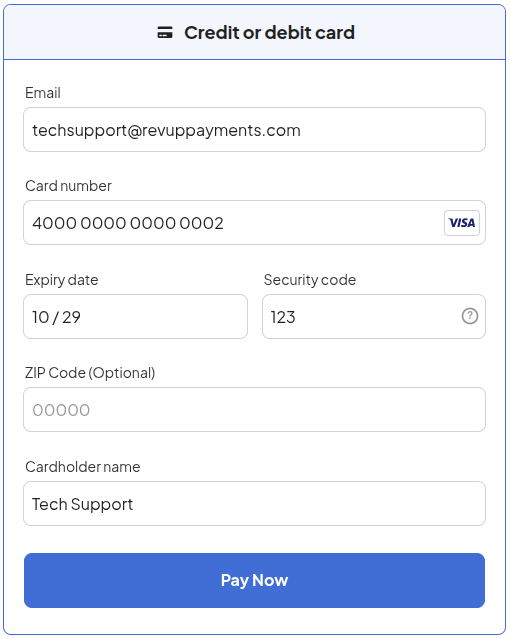
The following example shows a payment form filled in with the test card 4000000000000002:
Subscription module testing
The Subscription Module has its own test logic. Test it with the dedicated subscription test card and use the CardHolder value to control how the recurring transactions behave.
| Field | Value |
|---|---|
| Card number | 4000056655665556 |
| CardHolder | A function that defines the result of the recurring transactions. See Functions. |
How it works
- The initial transaction always returns Approved. It starts the subscription test process.
- Each recurring transaction generated after the initial transaction is evaluated according to the function in the CardHolder.
- The function is only applied when the CardHolder specifies an error.
- Write all CardHolder functions in uppercase letters.
- Specify the error with the format
Exxxx, wherexxxxis the four-digit Revup error code. For example:E0900.
Functions
| Function | Format | Example | Recurring transactions result |
|---|---|---|---|
| Alternated | ALT Exxxx | ALT E0900 | Approved and failed alternately, starting with approved. |
| Counter | Cxx Eyyyy | C03 E0200 | xx approved transactions, then failed with the error. |
| Special step | <sequence> Exxxx | SFSSFF E0900 | The exact sequence of approved (S) and failed (F) transactions. |
Select a function to see how it works:
- Alternated
- Counter
- Special step
The Alternated function uses a counter in the initial transaction. When the initial transaction is generated, the counter is set to 0:
- Each even counter value returns ✅ Approved.
- Each odd counter value returns ❌ Failed with the error specified in the CardHolder.
The first recurring transaction is therefore always approved.
Format: ALT Exxxx
Example: ALT E0900
| Recurring transaction | 1 | 2 | 3 | 4 | … |
|---|---|---|---|---|---|
| Result | ✅ | ❌ 0900 | ✅ | ❌ 0900 | … |
The Counter function returns a number of consecutive approved transactions. After that, every recurring transaction fails.
Format: Cxx Eyyyy
Cidentifies the counter function.xxis the number of consecutive ✅ Approved transactions.Eyyyyis the four-digit error code returned ❌ after the counter is exceeded.
Example: C03 E0200
| Recurring transaction | 1 | 2 | 3 | 4 | 5 and next |
|---|---|---|---|---|---|
| Result | ✅ | ✅ | ✅ | ❌ 0200 | ❌ 0200 |
Example: C01 E0900
| Recurring transaction | 1 | 2 | 3 and next |
|---|---|---|---|
| Result | ✅ | ❌ 0900 | ❌ 0900 |
The Special step function defines an explicit sequence of approved and failed recurring transactions:
Sreturns ✅ Approved.Freturns ❌ Failed with the error specified after the sequence.
Format: <sequence> Exxxx
Example: SFSSFF E0900
| Recurring transaction | 1 | 2 | 3 | 4 | 5 | 6 |
|---|---|---|---|---|---|---|
| Result | ✅ | ❌ 0900 | ✅ | ✅ | ❌ 0900 | ❌ 0900 |
Example: FFSFSFF E0800
| Recurring transaction | 1 | 2 | 3 | 4 | 5 | 6 | 7 |
|---|---|---|---|---|---|---|---|
| Result | ❌ 0800 | ❌ 0800 | ✅ | ❌ 0800 | ✅ | ❌ 0800 | ❌ 0800 |
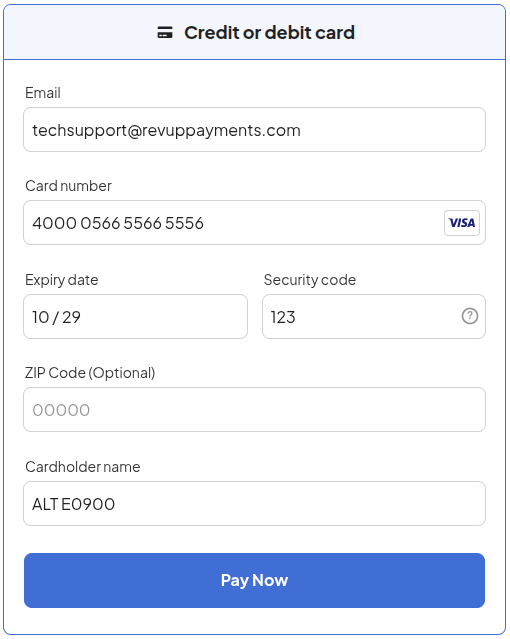
The following example shows a payment form filled in with the Subscription Module card and the ALT E0900 function in the cardholder name:
Test codes
The Mock Acquirer uses the following codes internally to define the result of each action:
| Category | Code | Description |
|---|---|---|
| Success | 0001 | Approved |
| Success | 0002 | Refunded |
| Success | 0010 | Authorized |
| Success | 0011 | Captured |
| Success | 0012 | Settled |
| Pending | 0003 | In Process |
| Pending | 0004 | TDS (3 DS) |
| Subscription | 0020 | Subscription |
| Authentication | 0103 | Authentication Failed or Incomplete |
| Authentication | 0104 | Authentication Not Available |
| Authentication | 0105 | Authentication Required |
| Authentication | 0121 | Authentication Failed - 3D Secure |
| Declined | 0102 | Authorization Failed |
| Declined | 0109 | Issuer Unavailable |
| Declined | 0200 | Do Not Honor |
| Declined | 0205 | Restricted Card |
| Invalid data | 0152 | Missing or Invalid Data - Recurring Model |
| Invalid data | 0303 | Invalid Credit Card |
| Invalid data | 0304 | Unsupported Card Brand |
| Invalid data | 0312 | Missing or Invalid Data |
| Invalid data | 0900 | Bad Input |
| Refund error | 0170 | Refund Error |
| Refund error | 0171 | Refund Rejected - Payment Not Yet Captured, Try Again Later |
| Refund error | 0172 | Refund Rejected - Payment Already Charged Back |
| Technical error | 0108 | Transaction not found |
| Technical error | 0800 | Provider's Connection Failed |
| Technical error | 0801 | Provider's Technical Error |
| Technical error | 0901 | Internal Server Error |
| Async | 1001 | Approved Async |
| Async | 1002 | Refunded Async |
| Async | 1170 | Refund error Async |
| Async | 1171 | Refund Rejected - Payment Not Yet Captured, Try Again Later Async |
| Async | 1200 | Do Not Honor Async |
| Timeout | 2000 | Forced Timeout with Success |
| Timeout | 2001 | Forced Timeout with Failed - Authorization Failed |
| Other | 9999 | Custom Failed. (Dynamic from database) |
| Other | 0000 | Unknown |
Summary
The Mock Acquirer allows you to test payment behavior without using real cards or processing real transactions.
For most payment scenarios, select a card from the test cards tables according to the scenario you want to test.
For subscriptions, use the dedicated Subscription Module card:
4000056655665556
and configure the desired recurring behavior through the CardHolder using one of the supported functions:
ALT ExxxxCxx Eyyyy<sequence> Exxxx